Audio calibration
Match compatible captures to your input reference, with independent calibration status for Pedal and NAM.
THE COMPLETE NAM RIG FOR iOS
A modular, stage-ready guitar rig for iPhone and iPad, verified for MacOS, with AI Assistant.
VERSION 4.9.26
Calibrate compatible captures, organize your tones with Quick Access Libraries, and track time-based effects at a glance!
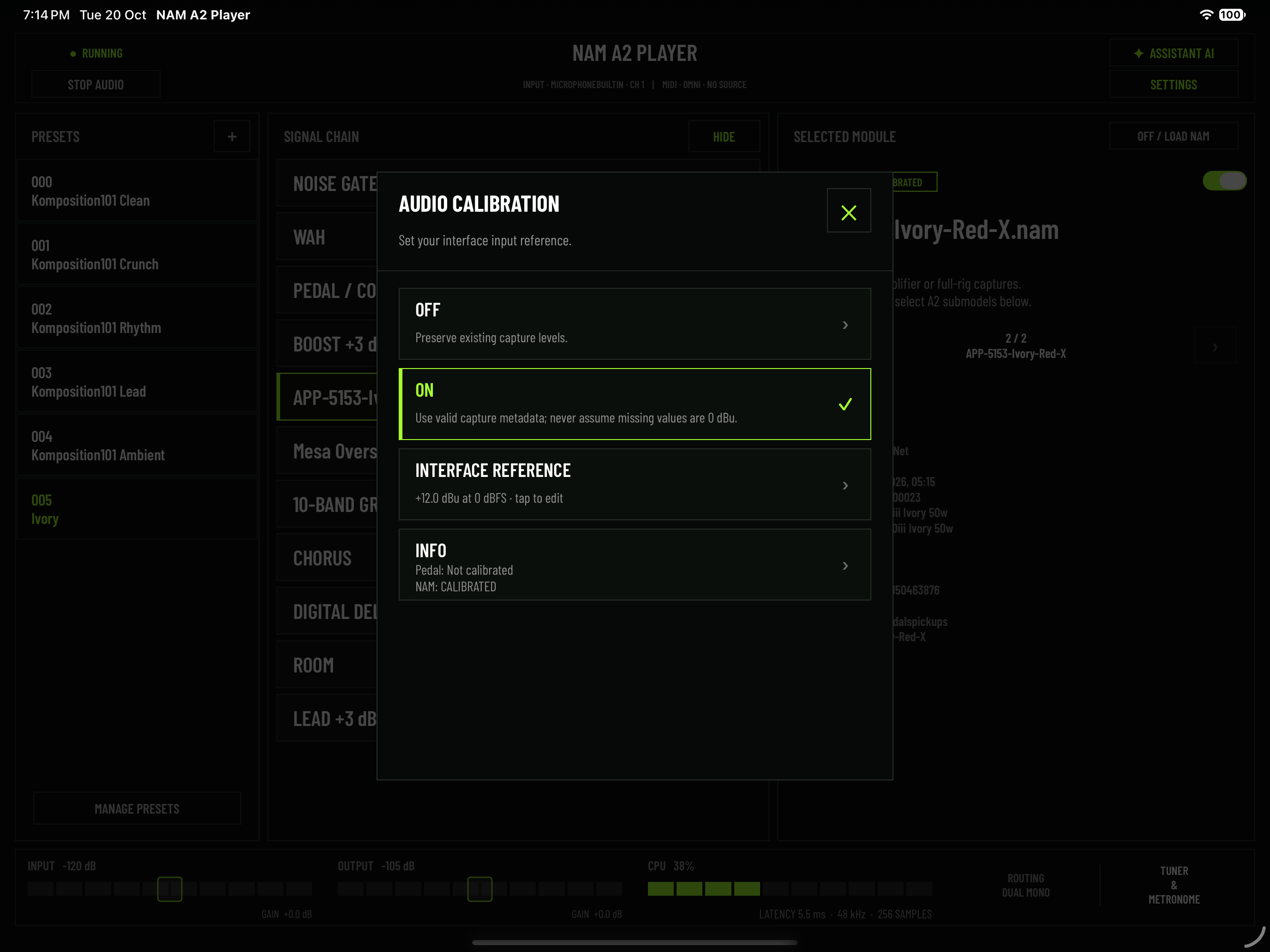
Match compatible captures to your input reference, with independent calibration status for Pedal and NAM.
Keep up to 100 captures or IRs in each of three dedicated Pedal, NAM and IR libraries.
Audition without closing the list, reorder entries and import or export each library separately.
Library imports merge with existing entries and automatically skip identical files.
Add every model from a returned list to the matching Quick Library without replacing the current rig.
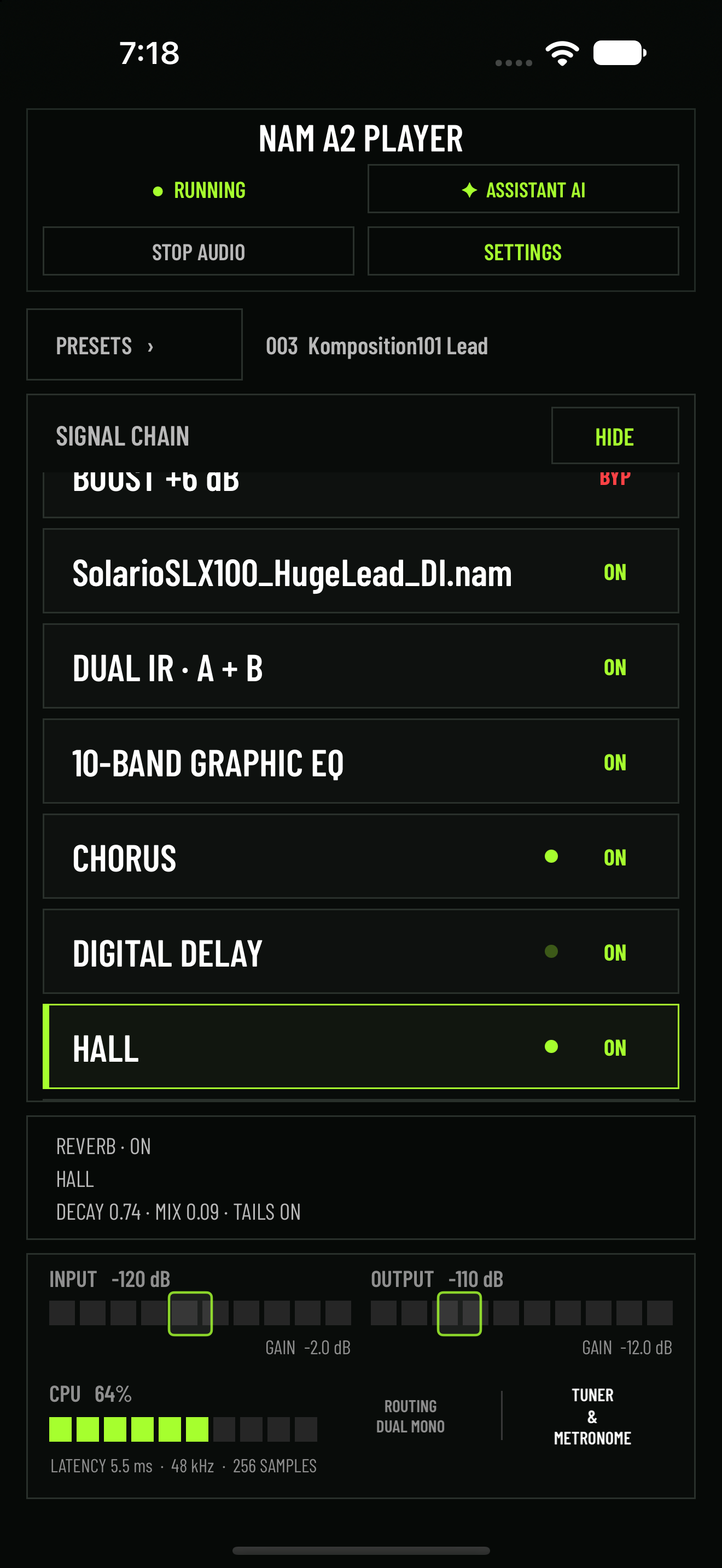
See timing feedback beside effects; active Reverb and AUv3 effects without reliable timing remain steadily lit.
Super is tried first, with Lightning and Ultra fallbacks; the last successful model is preferred for the app session.
Tap ROUTING for Audio Output or CPU for Audio Buffer settings, alongside updated AI knowledge and UI refinements.
YOUR SOUND, IN ORDER
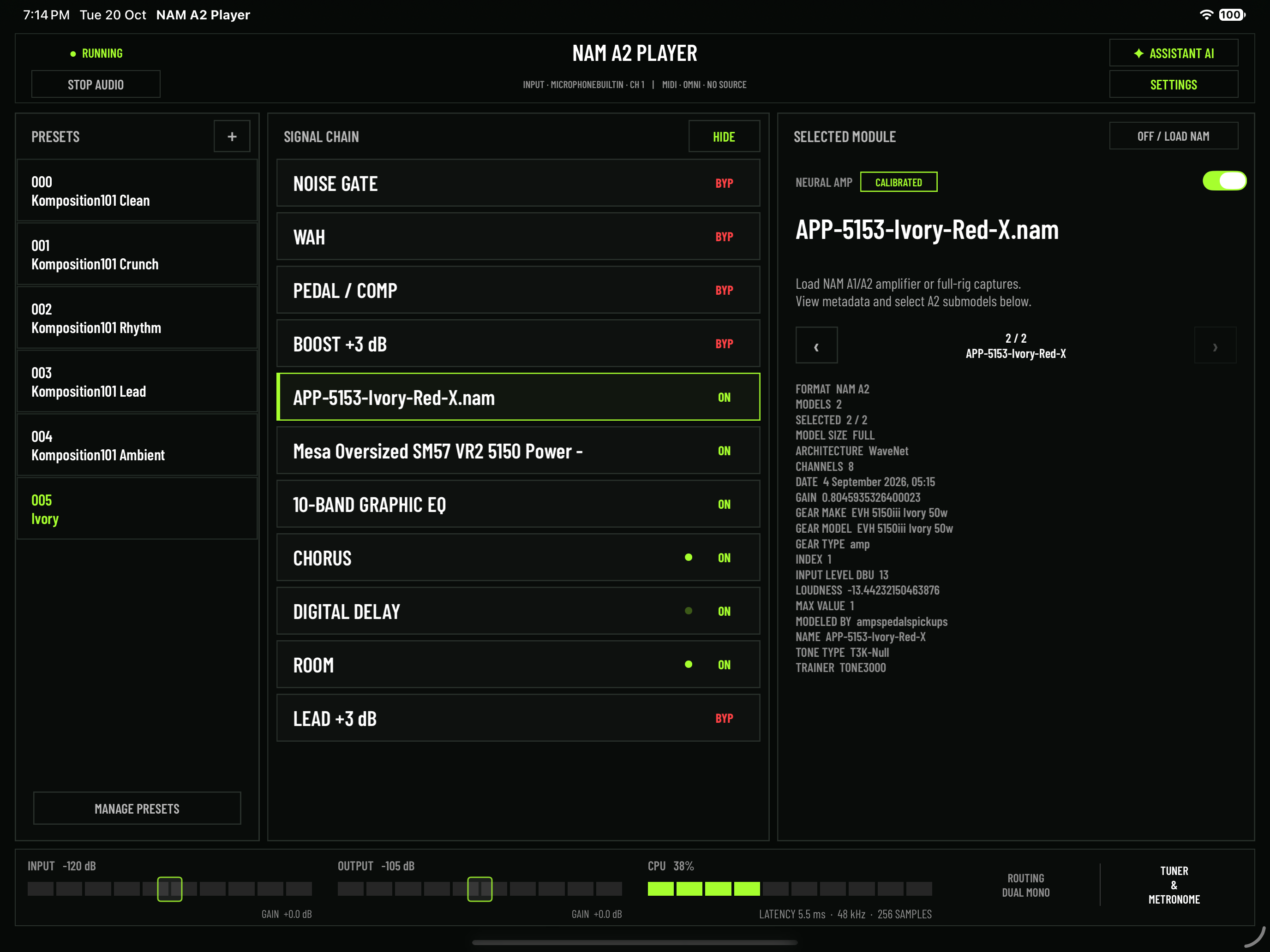
Tap a module to open its controls and parameter summary, or tap ON / BYP directly in the chain. Every stage stays visible and is saved with the preset.
Blend two cabinets, shape each one independently and use alignment delay to build a cabinet response that is wider, tighter or more focused.
OUTPUT ROUTING
THE COMPLETE RIG
Every processing role has a dedicated, visible block. Use built-in processing or, in standalone, host compatible AUv3 effects in Noise Gate, Wah, Pedal / Comp, Modulation, Delay and Reverb without losing sight of the complete signal path.
The complete Pedal menu includes four built-in Compressors, four built-in Overdrive & Distortion pedals, plus NAM Pedal for loading your own NAM A1 or A2 pedal captures before the NAM amp stage.
Classic, Vintage and Modern Wah sit before the amp. Hosted AUv3 effects retain their settings, receive forwarded MIDI and offer natural bypass tails in the Modulation, Delay and Reverb slots.
Select the hardware input, calibrate compatible Pedal and NAM captures to your input reference, monitor peak indicators and choose Dual Mono or Split PA / Amp routing.
MIDI Learn, global CC assignments, OMNI or channels 1–16, preset, tuner, Boost, Lead and Wah control—plus direct CC input and MIDI history in compatible AUv3 hosts.
Use buffers down to 64 samples, time-based FX activity dots, Adaptive Noise Gate Hold, a 1–400 BPM metronome and precision gain. Tap ROUTING or CPU for direct output and buffer settings.
ASSISTANT AI
Assistant AI analyzes a snapshot of your current rig and offers focused suggestions - without listening to your audio or changing settings.
Version 4.9.26 adds calibration status and corrections, built-in FX settings, EQ, routing, bypass states, hosted-effect details and metronome settings to every question. It can also offer practical tips and answer music theory questions.
Super is tried first, with Lightning and Ultra as fallback models. Try it yourself online!
The website assistant cannot hear audio, inspect the app or change your rig. Do not include personal or confidential information.
BUILT FOR THE MOMENT
Save every part of the rig, keep your most-used captures close and recall complete host presets in AUv3.
GOOD TO KNOW
Load standard NAM A1 and NAM A2 files into the pedal or amp stages—from overdrives and boosts to preamps, amplifiers and full rigs. NAM A2 files may contain multiple related submodels and embedded metadata. The Cabinet / IR stage loads WAV impulse responses in Single or Dual IR mode. In Dual IR, load two cabinets, set independent levels and Low / High Cut filters, adjust optional alignment delay and blend A/B. Presets retain both IR files and all associated settings.
Choose Dual IR in the Cabinet / IR module, load IR A and IR B, then move the Blend A/B control to combine them. Each side has its own Level, Low Cut and High Cut settings, while optional Alignment Delay lets you fine-tune phase interaction and transient focus. Both files and every Dual IR parameter are saved and recalled with the preset.
Yes. AUv3—Audio Unit version 3—is Apple’s plug-in format for using compatible instruments and effects inside iPhone and iPad music hosts or DAWs. Add NAM A2 Player to an audio track or effects slot in a compatible AUv3 host, then build and control your rig while the host manages the session and audio routing. Module-specific TONE3000 browsing works inside the plug-in, and compatible hosts can send CC messages through the NAM A2 Player MIDI entry for controls such as Wah expression and effect bypass. In standalone, NAM A2 Player can itself host compatible third-party AUv3 effects. Third-party effect hosting is unavailable while NAM A2 Player is running as a plug-in.
Wah is a dedicated module directly after Noise Gate and before Pedal, Boost and NAM. Choose Classic, Vintage or Modern, then adjust Position, Range, Resonance and Level. Use MIDI Learn to map Position to an expression pedal and assign Wah bypass to a footswitch. Wah selection and settings are stored with the preset; presets created before version 4.6.26 load with Wah unselected, so their sound remains unchanged.
Yes, in standalone mode. Load compatible third-party AUv3 effects into Noise Gate, Wah, Pedal / Comp, Modulation, Delay and Reverb. Each slot saves the selected plug-in and its settings with your preset, incoming MIDI can be forwarded to hosted effects, and optional Tails switches let hosted Modulation, Delay and Reverb decay naturally after bypass. Hosted AUv3 effects require stereo output: if an AUv3 preset is loaded while PA / Amp Split is active, audio stops safely and the app explains how to continue. Hosting is unavailable when NAM A2 Player itself runs as an AUv3 plug-in.
Assistant AI receives a read-only settings snapshot—not your audio—and uses it to provide focused suggestions without changing the rig automatically. Each question can include calibration status and corrections, the complete signal chain and bypass states, built-in FX settings, EQ, routing, hosted-effect details and metronome settings. Its knowledge covers setup, levels, latency, gain staging, Noise Gate, Wah, MIDI, NAM A1/A2 captures and submodels, pedals, Single and Dual IR, EQ, modulation, delay, reverb, shimmer, AUv3 hosting, presets, TONE3000, live preparation and troubleshooting. It can provide practical playing and tone-building tips and answer music theory questions. Super is tried first, Lightning and Ultra provide fallback models, and the last successful model is preferred for the current app session. An internet connection is required.
A NAM A2 file can bundle several related captures—such as different gain levels, channels or amp settings—inside one file. A badge shows how many submodels the file contains. Tap the NAM or NAM Pedal module to open its detailed view, inspect the A2 format, total model count, active model, architecture and available capture metadata, then use the previous and next controls to audition and select the submodel you want. Your selected submodel is retained with the preset, so the same variation is recalled the next time the rig is loaded. You can open the metadata view even when an A2 file contains only one submodel.
Use class-compliant audio interfaces supported by iPhone and iPad. Select the guitar input when an interface exposes multiple channels, monitor the peak indicators and choose a buffer down to 64 samples on supported setups. Core MIDI-compatible USB or Bluetooth controllers can use MIDI Learn, global CC assignments, OMNI or channels 1–16. In standalone, MIDI can also be forwarded to hosted AUv3 effects. Inside a compatible host, select the NAM A2 Player MIDI entry to send CC messages directly to the plug-in and confirm them with its activity indicator and recent-message history.
Yes, in the standalone app. Set any tempo from 1 to 400 BPM, use Tap Tempo to match a song, adjust click volume and enable the beat accent to make the start of each measure easier to follow.
Pedal, NAM and IR each have a separate Quick Library that can hold up to 100 compatible files. Audition entries without closing the list, reorder them to match your workflow and import or export each library independently. Imports merge with the existing library instead of replacing it and skip identical files. A model list returned by TONE3000 can also be added to its matching library without changing the files currently loaded in your rig.
Every audio interface converts the guitar’s analog signal at a slightly different level. Calibration lets NAM A2 Player compare your interface’s reference with calibration data stored in a compatible capture, then correct the level entering the model so it is driven more like the original gear was during capture. It adjusts input level—not EQ—and can therefore affect gain, compression and sustain while preserving the model itself. For the most accurate reference, use the interface’s Instrument / Hi-Z input, keep its gain at minimum and enter the manufacturer’s “Maximum Input Level at minimum gain” value in dBu; use the correct figure if a pad is engaged. Captures without valid calibration metadata are never assumed to be 0 dBu, and Pedal and NAM show their status separately. Calibration is optional, so you can leave it off to preserve existing capture levels or still adjust gain by ear. Read the TONE3000 NAM Calibration Guide.
Open TONE3000 directly from the module you are editing: browse IRs from Cabinet / IR, or choose NAM A1 / NAM A2 from the NAM and NAM Pedal modules. The downloaded capture returns directly to the originating slot, or add all models from a returned list to the matching Quick Library without replacing the current rig. This workflow is available in both standalone and AUv3. You can also load compatible files through Files from iCloud Drive, On My iPhone or iPad, external storage or another available location. Complete preset ZIP packages can include their required NAM, NAM Pedal and both IR assets for backup, transfer or sharing.
NAM A2 PLAYER × KOMPOSITION101
The complete NAM A2 Player × Komposition101 collection is now available. Download Clean, Crunch, High Gain Rhythm, Lead and Ambient—five exclusive presets built around FNDR Twin Verb, MRSH J45, MES JP IIc, Solario SLX100 and MTCHLSS Chief NAM A2 captures.
PLUG IN. LOAD UP. PLAY.
VERSION 4.9.26
CALIBRATION · QUICK LIBRARIES · TIME-BASED FX DOTSCalibrate compatible captures, organize your tones with Quick Access Libraries, and track time-based effects at a glance!